
Client Self-Service
Self-Service COI Portal
Generate and send your own certificates of insurance whenever a broker, shipper, client, or project partner needs one. The portal is free, unlimited, and available from your phone or computer any time you need it.
Already insured with Dream Assurance?
- Free to use
- Unlimited certificates
- Phone or computer
What the Self-Service Portal Does
If you already carry coverage with Dream Assurance, you do not have to wait on a request queue to get proof of insurance. The portal lets you create a certificate on demand, send it to the certificate holder, and keep a record of everything you have issued.
Simply put: the portal is for clients who already have coverage in place and need a certificate now. If you are still comparing coverage, the certificate of insurance page walks through what a certificate shows and what a contract may ask for.
How to Set Up and Send a Certificate
Set up your access once, then issuing a certificate takes a few minutes. Follow these steps in order the first time. Step 1 is the only setup you need, and steps 3 through 7 are the regular flow for every new certificate.
- Open the portal. Use the login button on this page and bookmark it on your phone and computer so it is easy to find when a request comes in.
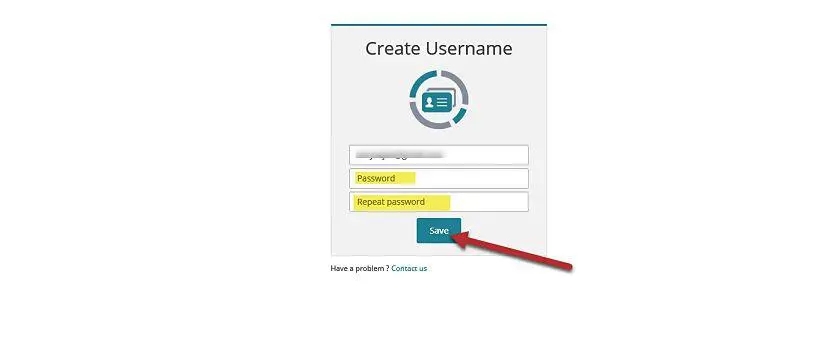
- Create your password. Your username is the email address on file with Dream Assurance. Set a password and save it, then sign in.
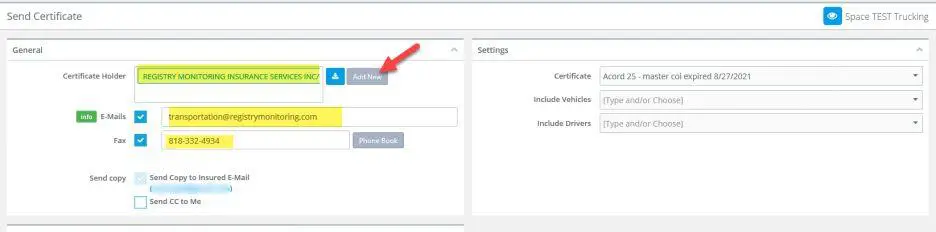
- Start a new certificate. Click Send Certification in the top right corner of the portal.
- Enter the certificate holder. Add the legal name and address of the company receiving the certificate. The portal saves these details for future requests.
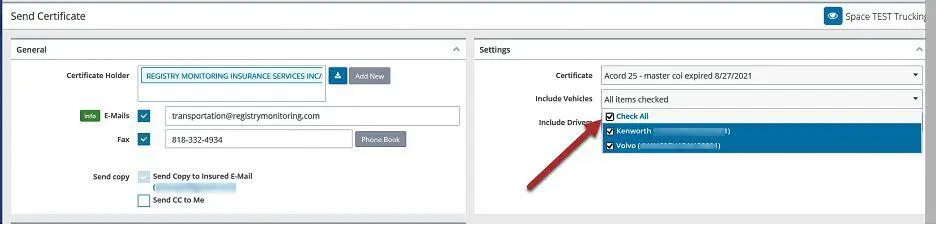
- Add the vehicles or equipment. For auto and trucking certificates, add the vehicles on this screen so the correct units appear on the certificate.
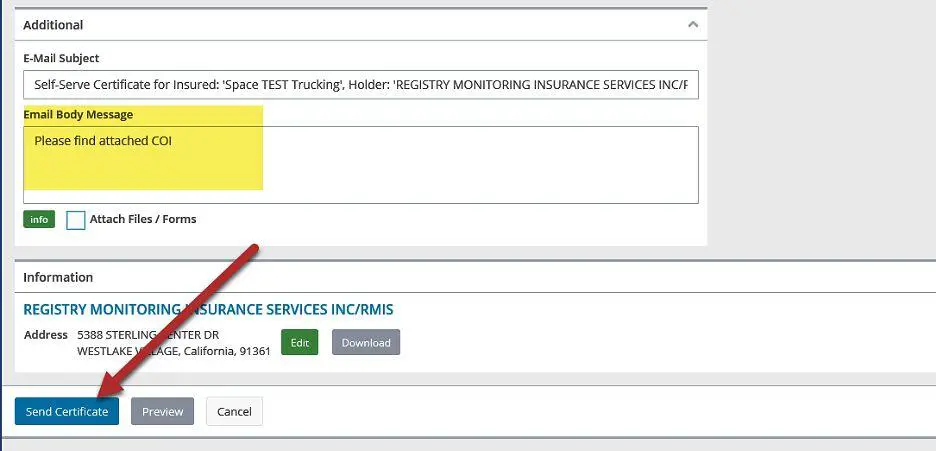
- Send the certificate. The subject line is filled in for you, and you can edit it or add a message to the recipient. Click Send Certificate when it looks right.
- Confirm it went out. Open Other, then Certificates Sent, to review everything you have issued and resend if needed.
What to Have Ready Before You Issue
Having these details on hand the first time makes setup faster and reduces back-and-forth with the party requesting proof.
- The certificate holder's exact legal name and mailing address
- The written request, contract, or lease if one was provided
- Any required limits or specific wording the requesting party asked about
- The project name, jobsite address, or contract number if applicable
- The deadline for sending proof of coverage
- The vehicle or equipment details for auto-related certificates
When to Contact Dream Assurance Instead
The portal handles routine certificate requests well. Some situations need a person, and those are worth a call so nothing is sent incorrectly.
- The request asks for additional insured, waiver of subrogation, or primary and noncontributory wording
- The contract requires a limit or endorsement that is not already on your policy
- The certificate holder name does not match the contract or the request looks unclear
- You need a certificate for a policy that is not showing in the portal
- Your coverage needs to change before the certificate can be issued correctly
If the request needs a policy change, our team can review the wording first. Contact our team with the contract's insurance clause and your current policy documents, and we will help you confirm what is already supported and whether a policy change is needed.
What You Will See in the Portal
The portal screens follow the same order as the steps above. If a screen does not match what you see, stop and contact us before sending the certificate.


Not a Client Yet?
This portal is for businesses that already have active coverage with Dream Assurance. If you are still deciding what coverage you need, or you want to understand what a certificate holder is actually asking for, start with the coverage page instead.
The certificate of insurance (COI) for business page explains what a certificate shows, who typically requests one, the terms that appear on a request, and how our team reviews coverage before proof is issued. From there you can look at general liability insurance, which is the coverage most certificates are built around, or review the wider business insurance options we compare across carriers.
Help With Your Policy or Account
Certificates are only one part of managing coverage. If you need something else, the Service Center is the place to start for policy changes, documents, payments, and claims support. You can also reach the team directly if you would rather talk it through.
Dream Assurance is an independent agency headquartered in Overland Park, Kansas, and we work with clients in the areas we serve. If you want a person instead of a portal, talk with our team and we will take it from there.
Get Your Certificate Out the Door
Log in, issue the certificate, and keep your operations moving. If anything about the request looks unusual, our team is one call away.